


We’re excited to announce that Newsletter Glue now supports BigMailer.io as an email service provider. If you’ve been looking for a budget-friendly ESP that doesn’t sacrifice features, this integration opens up some compelling possibilities for your WordPress newsletter workflow.
What is BigMailer?
BigMailer is an email marketing platform built for agencies, franchises, creators, and publishers who need to manage multiple brands without breaking the bank. Their pricing model is refreshingly simple: $1 per 1,000 contacts with unlimited emails, brands, and users.
What makes BigMailer stand out is its multi-brand architecture. You can run multiple newsletters or client accounts from a single dashboard without switching logins. Agencies get a white-label option to brand the platform as their own.
The platform includes built-in email validation with automatic spam trap removal to protect your sender reputation. You get flexible sending options too—bulk campaigns, automated drip sequences, and transactional emails all live in one place. And their support team is available seven days a week via chat from 8am to 8pm EST.
BigMailer users consistently praise the platform’s deliverability and customer service. For publishers managing tight budgets or agencies juggling multiple clients, the flat-rate pricing structure eliminates the surprise bills that come with list growth on other platforms.
What You Can Do with Newsletter Glue + BigMailer
Once connected, you get the full Newsletter Glue experience with BigMailer as your delivery engine. Build your newsletters using the WordPress editor you already know, then push them out through BigMailer’s infrastructure.
Your existing BigMailer segments work seamlessly—target specific subscriber groups without rebuilding anything. Newsletter Glue’s built-in forms grow your list directly in BigMailer, and any custom merge tags you’ve set up carry over.
No migration required. Just connect your API key and you’re ready to publish.
Getting Started
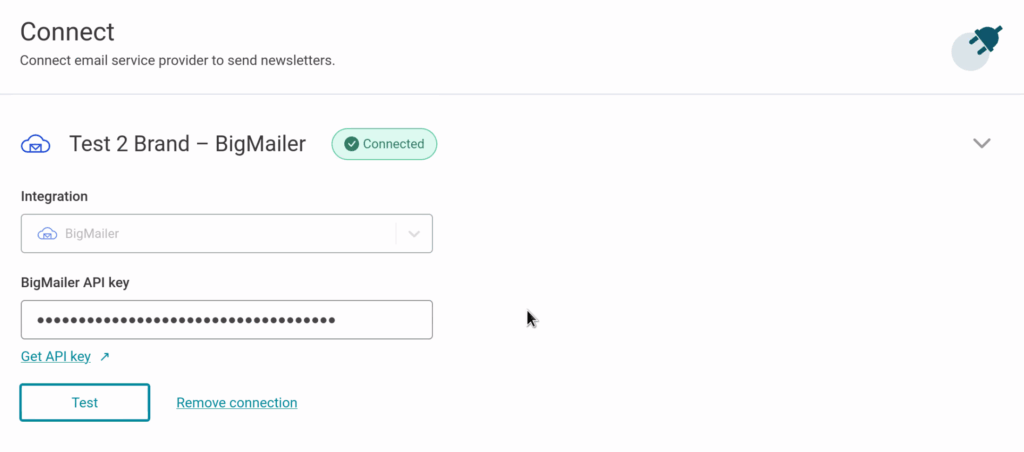
The setup takes about two minutes. Grab your API key from BigMailer, then in Newsletter Glue go to Newsletters → Settings → Connections. Select BigMailer, paste your API key, and click Connect. You’ll see a “Connected” status and you’re ready to send.
A few requirements to keep in mind: you’ll need a verified domain in BigMailer, and noreply@ addresses aren’t allowed. If you’re using Amazon SES through BigMailer, make sure your domain verification is properly configured.
Enjoying this post?
Don't miss the next one.
Subscribe to get our latest product updates and blog posts.

Who Should Consider This Integration
This pairing makes particular sense for budget-conscious publishers who want professional email marketing without enterprise pricing. It’s a strong fit for agencies managing newsletters for multiple clients who need centralized billing and brand management.
Growing newsletters benefit from predictable costs as lists scale. And WordPress-first teams get to stay in their CMS rather than switching to a separate email editor for every send.
Try It Out
Already using BigMailer? Connect it to Newsletter Glue and streamline your publishing workflow.
New to BigMailer? Try it out with 30% off on your 1st month or ask for a free month trial via their live chat support.
Check out our full integration guide for step-by-step instructions with screenshots.
Questions about the BigMailer integration? Book a call with our team or reach out through our contact page.
Sign up for more newsletter building and growth tips.
