


If you’re running a publication on WordPress, you’ve probably hit the same wall most publishers do: your content management is solid, but your email marketing feels bolted on. You’re toggling between platforms, managing duplicate subscriber lists, and wondering why something that should be simple feels so complicated.
HubSpot’s Marketing Hub Enterprise gives you serious marketing automation firepower—advanced segmentation, detailed analytics, and a CRM that actually talks to your email campaigns. But for WordPress publishers, there’s always been a catch: you have to abandon your content workflow and build emails in HubSpot’s interface.
Newsletter Glue’s HubSpot integration solves this. You keep creating in WordPress (where your content already lives), but send through HubSpot’s infrastructure. No migration. No duplicate work. Just a direct API connection between the two platforms.
What This Integration Actually Does
You collect subscribers directly in WordPress. Our built-in forms connect straight to your HubSpot account. Someone signs up on your site, they’re immediately in your HubSpot CRM with all the contact properties you’ve set up.
You build newsletters in the WordPress editor you already know. Write, format, add images, embed content—all in the Gutenberg editor. When you’re ready to send, Newsletter Glue pushes it to HubSpot via API.
You leverage HubSpot’s segmentation without leaving WordPress. Send to specific lists, use HubSpot’s merge tags, and tap into all the contact segmentation you’ve built in your CRM. Your WordPress dashboard becomes your email command center.
You get HubSpot’s deliverability and analytics. Your emails send through HubSpot’s verified infrastructure, and all performance data lives in your HubSpot account where you can track opens, clicks, and conversions alongside your other marketing metrics.
Who This Is For
This integration requires HubSpot Marketing Hub Enterprise. That’s not cheap (~$3,600+/month), so this makes sense for publishers who:
- Already use HubSpot for CRM and marketing automation
- Need enterprise-grade deliverability and compliance features
- Want unified subscriber data across marketing, sales, and service teams
- Have complex segmentation requirements that justify HubSpot’s capabilities
If you’re a smaller publisher or just getting started with email, Newsletter Glue integrates with more affordable ESPs like Mailchimp, SendGrid, and Mailgun. But if you’re at the scale where HubSpot makes sense, this integration eliminates the platform-switching headache.
How It Works
The setup is straightforward:
Enjoying this post?
Don't miss the next one.
Subscribe to get our latest product updates and blog posts.

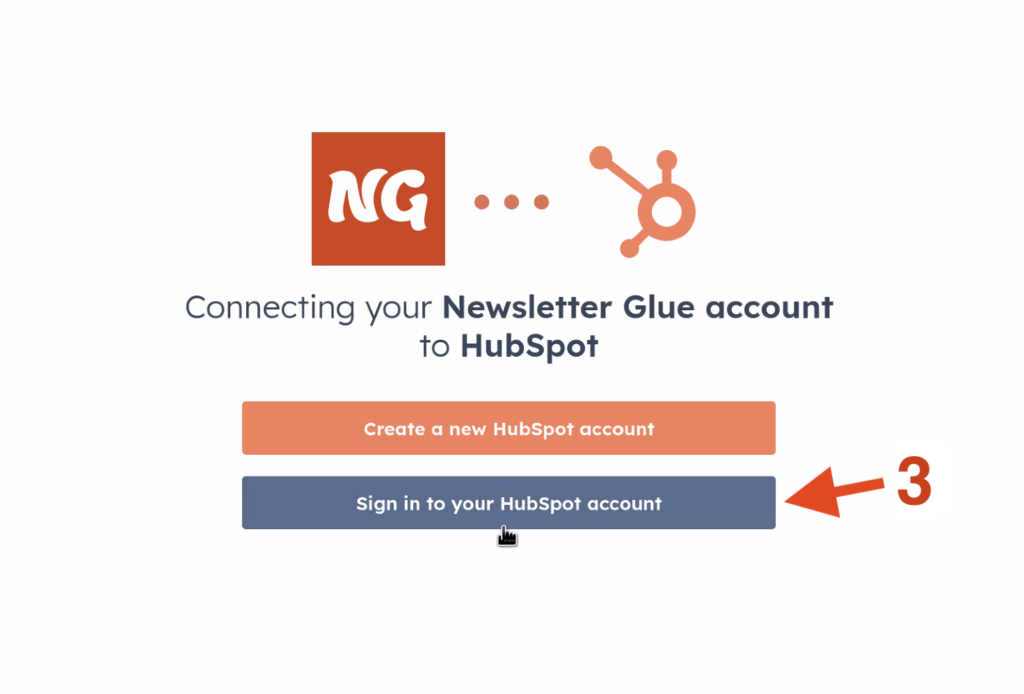
- Connect via OAuth during onboarding (or add it later in Settings > Connections)
- Choose your HubSpot account when prompted
- You’re connected – Newsletter Glue can now access your lists and send through HubSpot’s API
One critical requirement: you must verify your sending domain with HubSpot. This is standard for any email platform and ensures your emails actually reach inboxes. HubSpot’s documentation walks you through the DNS records you’ll need to add.
Once connected, you’ll see your HubSpot lists available when creating campaigns in WordPress. Select your audience, preview your newsletter, and send—all without leaving your WordPress dashboard.
The Real Benefit: Your Content Workflow Stays Intact
Here’s what most publishers discover after switching to an enterprise ESP: suddenly your writers are working in one system while your email team is working in another. Content gets copied, pasted, and reformatted. Images get re-uploaded. Someone forgets to update the web version when they fix a typo in the email version.
Newsletter Glue eliminates this friction. Your WordPress posts are your newsletters. Your WordPress editor is your email builder. Your content team doesn’t need HubSpot training because they’re working in the same interface they use every day.
Meanwhile, your marketing team gets everything HubSpot offers: A/B testing, automation workflows, lead scoring, and attribution reporting. The integration doesn’t dumb down HubSpot’s capabilities—it just moves your content creation to where it belongs.
Getting Started
If you’re already on HubSpot Marketing Hub Enterprise and running WordPress, you can connect Newsletter Glue in about five minutes. Grab your Newsletter Glue license, follow the OAuth flow to connect your HubSpot account, verify your domain if you haven’t already, and you’re ready to send.
Not on Newsletter Glue yet? We offer a 30-day money back gurantee. Install the plugin, connect your ESP (HubSpot or any of our other integrations), and see if consolidating your email workflow in WordPress makes sense for your publication.
Get Started with Newsletter Glue →
Sign up for more newsletter building and growth tips.
